My Fairy Princess Controls and HUD
The demo already prints keys on screen. Here they are in one place before the UI moves again.
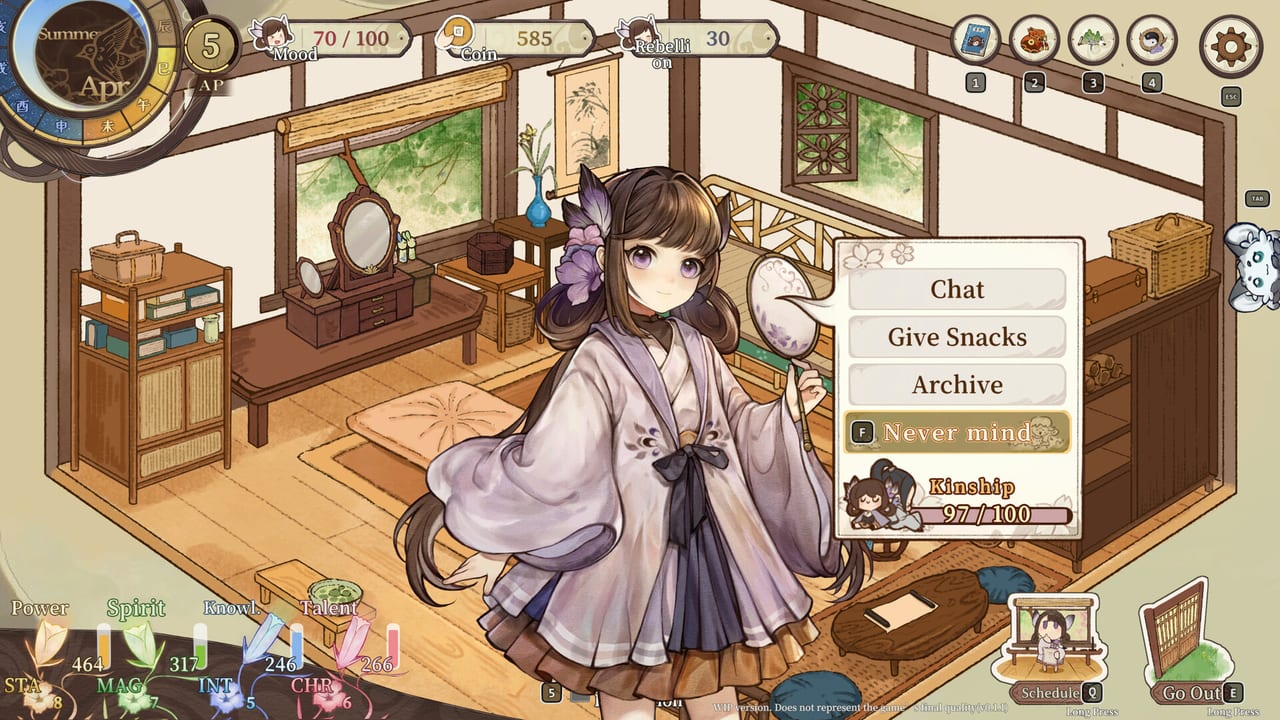
My Fairy Princess is a menu-heavy life sim with a separate combat camera. Steam lists partial controller support, DualShock, DualSense, and Family Sharing. The screenshots we have are keyboard-forward: they print F, E, Q, R, Esc, Tab, and a numeric 5 on the HUD. Use this page as a snapshot of the current demo prompts, then re-check in-game after a patch. For how those keys fit a week, read daily life. For fight Confirm/Cancel, read combat.
Keyboard prompts visible on official shots
Home interior
- F — interact / confirm. Also shown as Long Press F on some objects (bed, kettle).
- E — Go Out (door tile on the lower right).
- Q — Schedule.
- R — View on the wardrobe.
- 5 — Show Interactions (a toggle, not a fifth skill).
- Esc — settings gear in the top right.
- Tab — marked on the right edge; in the Friends book it sits near the Daughter / Friends tabs.
- Numbered HUD coins 1–4 — book, food, plants, character. These look like menu shortcuts, not combat hotkeys.
Town (Meadowville)
- F — Home on the lower-right house icon.
- Mail and extra UI chips appear on the right; a controller glyph is visible in at least one interior shot, which matches Steam’s partial pad support.
Friends book
- Q — Turn Page.
- Esc — close.
- Tab / vertical labels for Daughter, Friends, Age.
Combat
- F — Confirm.
- Esc — Cancel.
- Q — left-edge prompt; treat as a combat menu until a tooltip names it.
If your language pack moves these, trust the on-screen prompt over this table. English shots are the source.
Controller and accessibility
Partial controller support means you should expect keyboard for some menu typing and pad for movement. DualShock and DualSense are listed, so a PlayStation pad on Windows is a reasonable experiment. There is no official full-remap screenshot yet. If a prompt stays on F while you are on a pad, look for an on-screen button hint rather than assuming the bind is broken.
Steam does not list a colorblind mode in the public description. If you need UI scale or subtitles, use the gear (Esc) and the launch language: English, Japanese, Korean, Simplified Chinese, Traditional Chinese. Chinese has full audio.
HUD literacy is a control
You “control” the game as much by reading meters as by pressing F:
- Seasonal clock and AP
- Mood
- Coin or Silver
- Rebellion or Defiance
- Four growth columns (names still moving)
- Kinship inside the Chat radial
Getting Started teaches those meters. This page exists so you stop hunting the Schedule key in a panic while AP burns.
Suggested sensitivity for new parents
- Play the first hour on keyboard even if you own a pad, so the printed letters match your hands.
- Bind nothing in third-party tools until the demo stops renaming Home and Go Out.
- Never skip the Long Press cues — beds and kettles are not the same as a quick Chat.
- In combat, hover Confirm until you know whether F is a swing or a menu accept. Cancel is cheap; a dead daughter’s Mood is not.
- When the UI wraps a word (“Rebellio n”), that is a localization bug to send via links, not a new stat.
Settings worth opening once
Language, audio (voice packs are Chinese-complete), subtitle size, and any windowed mode your GPU prefers. Specs live on system requirements. The demo is light on paper (GTX 650 class in the minimum line) but WIP overlays and 1280+ UI art can still hitch on weak iGPUs. If the clock stutters, drop to windowed before you blame AP regen.
After controls feel boring, you are ready to play. Boring is the goal. The interesting decisions are on Schedule, in the Friends book, and on the ending planner, not in the keybind screen.
Frequently Asked Questions
Quick answers for demo players, parents, and ending hunters.
What key opens the schedule in My Fairy Princess?
Q on current English screenshots, with a Schedule label on the home HUD. Combat and the Friends book also reuse Q for other panels.
How do I leave the house?
E Go Out from the interior. F Home from Meadowville. See daily life.
Does the game support a controller?
Steam lists partial controller support plus DualShock and DualSense. Keyboard prompts are still the ones printed on official shots.
Where is the settings menu?
Esc / the gear in the top right of the life-sim HUD. Language is also a first-boot Steam choice.