My Fairy Princess Guides
From the first AP spend to a planned ending — every how-to in one Fairyland map.
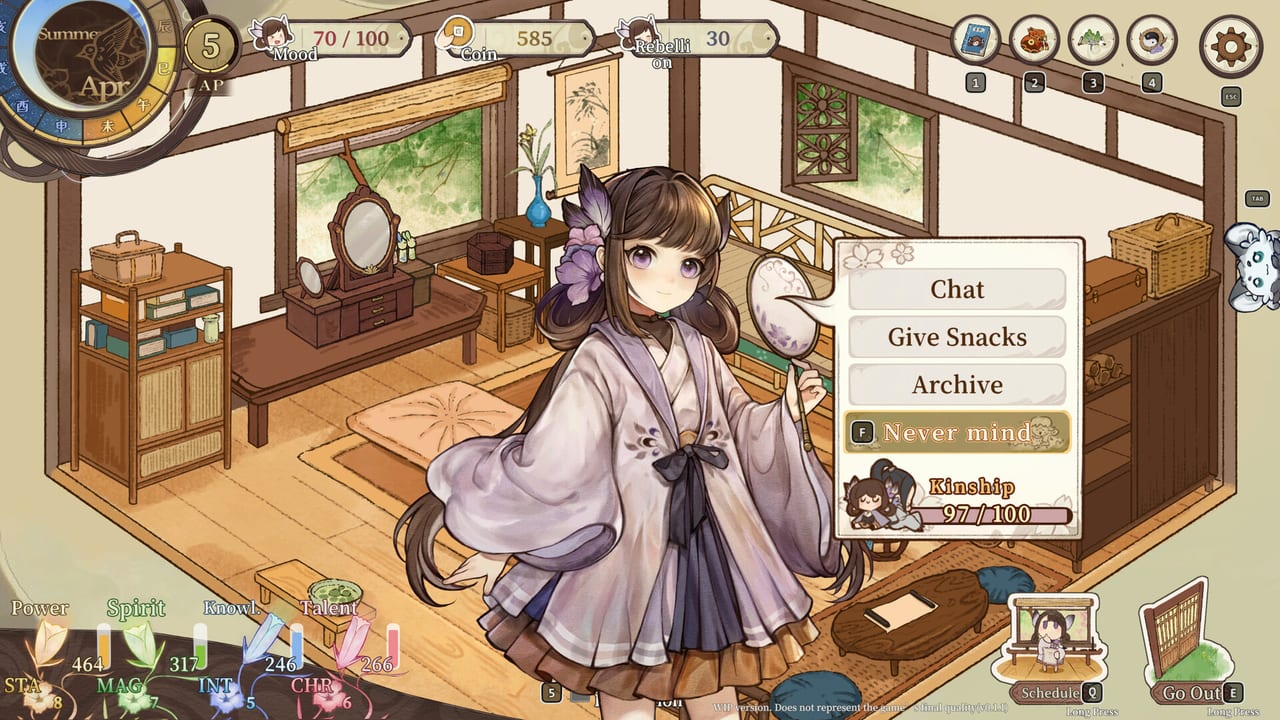
This hub is the map for parents who just opened My Fairy Princess on Steam. The full game is still in a 2026 window, but the live demo already shows the loop: you are the adult in the house, your daughter is the one growing, and every chat, snack, outing, and fight writes a line in her fate. Use the pages below instead of guessing from a single screenshot.
Start with Getting Started if you have not finished the opening days. If the demo build is what you actually have installed, jump to the demo walkthrough. Both pages assume single-player Steam on Windows — there is no online party to carry you.
What these guides cover
Fairyland is a small, dense life sim with RPG travel on the borders. The store page promises farming, cooking, fishing, elixir work, markets, seasons, and a wild region where a divine weapon can “reason” with trouble. Demo HUDs already show AP, Mood, Coin or Silver, Rebellion or Defiance, Kinship, a seasonal clock, and a four-stat block that has used names such as Power / Spirit / Knowledge / Talent in one build and Physique / Mind / Literature / Talent in another. Labels are still moving. The jobs those meters do are stable enough to teach.
- First-hour setup, language, and what the parent actually clicks: Getting Started
- What the current Steam demo includes, and how to spend a test week: Demo walkthrough
- Chores, food, outings, and the calendar: Daily life
- Party fights in the grass, HP bars, and when to go home: Combat and exploration
- Sister styles — bruise-party, bruise-pass, mild, judgement, no-press: Combat styles
- Companion books, memory scenes, and rank gates: Romance and bonds
- Elixirs, snacks such as osmanthus cake, and why cooking is not flavor text: Alchemy and crafts
- Keyboard, prompts, and partial controller support: Controls
- Meadowville, seasons, Home vs the wilds: Fairyland map
- Festival calendar — Lantern, Spring, Summer, Mid-Autumn, New Year: Festivals
- Father / mother route, six philosophies, CG bias: Parent role
- Later lives, regrets, and hidden unlocks: New cycles
How to use the rest of the wiki
Guides tell you how. Other hubs tell you who and why. After one honest week in Meadowville, open the characters hub so you know the daughter sheet from a friend sheet. Then skim ending paths before you dump every AP into one chore. If you already know you want a healer, an enchantress, a wandering hero, or a quiet mortal life, skip straight to the ending planner and work backwards.
Patch timing lives under updates. Official Discord, Steam, and support mail sit on links. System specs and the “will this laptop run it” question sit on system requirements.
A note on videos
The official demo trailer is embedded on the home page. KDream’s YouTube channel exists but is mostly empty/private at the moment, so we only embed videos with confirmed, real IDs. Additional developer walkthrough clips will be added here when they are public.
How we write while the game is still upcoming
Every mechanic named here is either on the English Steam page, in KDream’s community posts, or readable on official screenshots (HUD text, Liu Yuyue’s friend book, combat hearts). We do not invent recipe tables or ending thresholds. When a demo label disagrees with an older screenshot, we say so and point you at the demo notes. Treat this hub as a living map, not a datamined wiki from a finished RPG.
When you finish a guide, follow its sibling links in the same dropdown. Daily life without combat is only half a season; romance without a path in mind is how you lock Enamored on the wrong person. Raise her on purpose.
Frequently Asked Questions
Quick answers for demo players, parents, and ending hunters.
Which My Fairy Princess guide should I open first?
New parents: Getting Started. Anyone with the demo installed: demo walkthrough. Anyone hunting a career: ending planner.
Do these guides assume the full 2026 release?
No. They are written for the upcoming full game plus the live Steam demo and August 2026 playtest. Unconfirmed numbers are marked as demo-era.
Why is there no codes page?
My Fairy Princess is a premium Steam life sim, not a live-service Roblox title. There are no public item codes to redeem. Use updates for demo and patch news.
Are the HUD names final?
Not yet. Official screenshots show both Coin and Silver, Rebellion and Defiance, and two four-stat naming schemes. See daily life and controls.